

A rule that acts on the session’s closing bar runs correctly for months. Then, one Monday in March, it fires an hour early and keeps doing so for three weeks. Nothing was edited. The data is the same data, the broker is the same broker, and the strategy still compiles, still backtests, still loads without complaint.
What changed is that two clocks moved apart.
Every line of code that mentions a time is asking a question of some clock. When something goes wrong, the arithmetic is not necessarily the culprit. It could be the code asking a different clock than the one you had in mind.
That is the whole article, and like the last one it is testable rather than philosophical. Everything below comes down to a clock disagreement or a session boundary. Nothing that failed that test made the list.
Key takeaways
- Four clocks are usually in play at once: the exchange’s, the data vendor’s, the broker’s server, and the machine under your desk. Most of the year they agree closely enough that nothing surfaces.
- The offset between two exchanges is not a constant. New York and Frankfurt sit five hours apart rather than six on fourteen to twenty trading days a year, depending on the calendar, because the US and the EU change their clocks on different dates.
- Your data does not change when the time zone setting changes. The prices, the highs, the lows, and the dates stay identical. Only the timestamp moves, which is why the failure is a rule that quietly acts on the wrong bar rather than a chart that looks wrong.
- Session definitions themselves move. Eurex brought the DAX future’s open forward by seven hours in 2018; CME removed a fifteen-minute pause from equity index futures in 2021 without changing the session’s outer boundaries at all.
- A backtest will not surface this on its own, but it can confirm it. The transition dates have to be run deliberately; inside a ten-year run, fourteen to twenty days a year vanish into the average.
Jump to: Four clocks · What goes wrong · Why your tests missed it · Four checks · Before you trade it
Four clocks, one timestamp
When your code reads a bar’s time, the number it gets came from somewhere. There are usually four candidates, and they are not interchangeable.
- Exchange time is what the venue says. It is the only one anchored to the thing you are actually trading — and on OTC instruments like spot FX and CFDs there is no venue, so it does not exist at all.
- Data-vendor time is what the feed stamped the bar with, and it may not match the exchange’s. Data can arrive already normalized to a zone the vendor chose. NinjaTrader makes the gap visible: it writes exports in UTC and cannot infer the zone of a file you import, so it asks you to declare it.
- Broker or server time is set by the broker, not by the platform, and often follows its own daylight-saving rule.
- Local time is the clock on your machine, and its offset is an operating-system setting.
MetaTrader MQL is worth taking first, because it exposes several of these clocks as separate functions instead of hiding the choice behind one. TimeCurrent() returns the last known server time, formed on the trade server and independent of your PC. TimeTradeServer() also returns the trade server’s time, but calculates it inside the terminal using your PC’s settings. TimeLocal() returns your machine’s local time. And TimeGMT() returns GMT, with the daylight-saving adjustment likewise taken from the computer the terminal runs on.
TimeCurrent() and TimeTradeServer() are the clock half of this article in one API: two functions that both answer what time it is on the server, differing only in where the calculation happens. That separation is a strength. Every platform has to settle the same question somewhere; MQL makes you settle it in the code.
Worth noticing which clock is absent, and why. There is no exchange-time function, and across most of what MetaTrader quotes there could not be one: spot FX and CFDs have no venue whose clock could be reported. Where an exchange does sit behind an instrument, the terminal reports its session times in server time rather than exposing a separate exchange clock. So the server is less MQL’s preferred clock than the only one that means the same thing across everything it quotes.
The other platforms make the same distinction with different vocabulary.
TradingView Pine Script avoids the ambiguity at the bottom of the stack by not storing a local time at all. The time variable holds a UNIX timestamp in milliseconds: a count forward from a fixed instant, carrying no zone of its own. A zone is applied later, only when that number has to become something a human reads. syminfo.timezone holds the current symbol’s exchange time zone, and the time-related function overloads that take a timezone parameter default to that variable. So Pine’s answers default to the exchange, which is the sane default. The trap is that the symbol’s time zone and the chart’s time zone are two different things, and they can disagree depending on how the chart is set up.
TradeStation EasyLanguage has two time words that look like siblings and are not. CurrentTime is the clock on your computer right now, expressed in EasyLanguage’s HHMM form — the equivalent of asking the operating system what time it is, and unrelated to the bar being processed. Time is the ending timestamp of the bar being processed. On a time-based bar that is the bar’s closing time throughout, including while the bar is still forming, because the end is known in advance. On a bar type that is not time-based — tick and volume bars, and advanced chart types like Renko and Kagi — the end is not known in advance, so a bar still forming carries the time of its latest tick and only settles when the bar completes. The zone it is expressed in follows the chart’s Time Zone setting: Local or Exchange. Those are the two that get mistaken for one another, but they are not the whole vocabulary. BarDateTime gives the bar’s date and time together, down to seconds, as a DateTime object rather than a bare HHMM number.
MultiCharts PowerLanguage works the same way: the chart’s time zone setting governs how bar timestamps are displayed. CurrentTime is the computer’s clock now; Time is the ending timestamp of the bar being processed — fixed in advance on a time-based bar, tracking the latest tick while a bar that is not time-based is still forming — in whichever zone the chart is set to. Here too the pair is a starting point rather than the full list — Time_s and DateTime sit alongside them, differing in format and resolution. MultiCharts .NET carries the same behavior into Bars.Time.
NinjaTrader NinjaScript builds the distinction into the API surface, with conversion helpers pointing both ways. A session’s start and end come back as ActualSessionBegin and ActualSessionEnd, already converted to your configured time zone, while ActualTradingDayExchange gives a session’s date as the exchange defines it. GetTradingDayBeginLocal() converts a trading day’s start from exchange time to local, and ToApplicationTime() converts into the zone selected under Tools > Options > General. Worth noticing: the DateTime parameters across those methods are named timeLocal. The API expects local time from you and does the exchange conversion itself.
Read across the six and the pattern holds, with one instructive exception. The bar’s timestamp is not a property of the bar. It is a property of the bar plus a setting, and that setting lives outside the code you are reading. On five of them it is a platform option you choose. On MetaTrader it is the broker’s server clock, which you do not choose at all — and that is the harder case, not the easier one, because there is no menu to go and check.
What actually goes wrong
Seven kinds are worth separating. All of them survive a clean compile and most survive a clean backtest.
| Failure | What it looks like | Which clock is answering |
|---|---|---|
| Two venues drift apart for part of the year | A time rule keeps firing, an hour out of place, for weeks | Local, against the exchange |
| The missing hour and the repeated hour | Local-time schedules skip a run or run twice | Local |
| The session template has gone stale | Bars include or exclude the wrong trading hours | None — the session definition |
| A 24-hour instrument still has a day boundary | Daily bars and levels shift wholesale | Broker or data vendor |
| Yesterday is not today minus one | Weekends, holidays, and half-days break the reference | Exchange calendar |
| Venues that never change their clocks | Your offset to them moves instead | Exchange, against local |
| History and live feed stamped differently | Backfill disagrees with real time | Data vendor, against broker |
The offset between two exchanges is not a constant
The United States starts daylight saving on the second Sunday in March and ends it on the first Sunday in November. The European Union starts on the last Sunday in March and ends on the last Sunday in October. Those rules do not line up, so for a stretch each spring and for a week each autumn, the gap between New York and Frankfurt is five hours instead of six.
In 2026 that is 8 to 28 March and 25 to 31 October: twenty-eight calendar days, twenty of them trading days. The spring window is not even a fixed length. It lasts twenty-one days in 2024 through 2026 and fourteen in 2027 through 2029, depending on where the second and last Sundays fall. The autumn window is always seven.
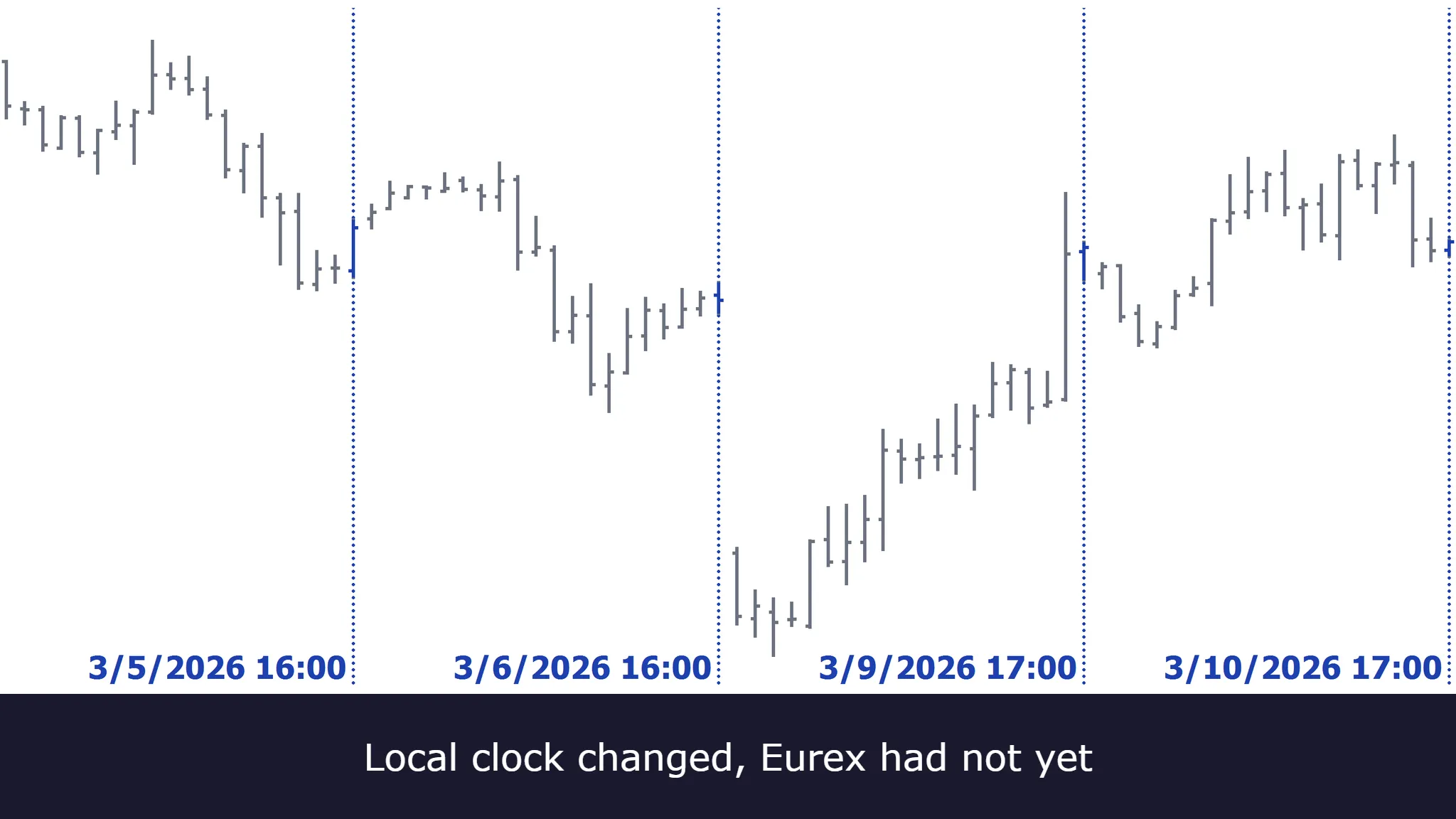
Here is what that does to real bars. The DAX future on Eurex, daily bars for March 2026, exported twice from the same platform with nothing changed except the chart’s Time Zone setting. The table tracks the session close because that is where most rules are keyed, but the shift is not confined to it — every timestamp in the series moves together, session open included:
| Trading days | Exchange time | Local time (New York) | Offset |
|---|---|---|---|
| 2 – 6 March | 22:00 | 16:00 | 6 h |
| 9 – 27 March | 22:00 | 17:00 | 5 h |
| 30 – 31 March | 22:00 | 16:00 | 6 h |
Fifteen bars in the middle block. The transitions land on 9 March and 30 March, the first trading days after the US and the EU changed their clocks.
The important part is what did not change. Compare the two exports field by field and the dates are identical, as are the open, high, low, close, and volume on every one of the twenty-two bars. The time zone setting is a display setting. Ticks are grouped into bars according to the session definition, and that definition is anchored to the exchange, so changing the zone you view them in cannot regroup them. It only relabels them.
That distinction determines how much you need to recheck. If a display change could reshape bars, every zone switch would mean revalidating the whole strategy. It cannot, so the bars, the indicators built on them, and the signals they produce are all untouched. What moves is the label — and with it every comparison in your code that tests a timestamp against a literal.
Which makes the danger narrower and nastier than “everything shifts”. A rule that says the session close is at 1600, written against that local-time chart, picks the right bar from 2 to 6 March. From 9 to 27 March the close has moved to 17:00, so the rule still finds a 16:00 bar and still fires — an hour early, on a bar in the middle of the session rather than the one that ends it. On 30 March it is correct again. Same code, same data, no error and no warning, across two windows you have no particular reason to sample.
Exiting an hour early is the milder version, and what it costs turns entirely on which close the rule is keyed to. Volume and volatility trace a rough U across a session — heaviest at the open, thinning through the middle of the day, then building again into the close — and the closing end has been growing, with US closing auctions rising from around 3% of daily volume in 2010 to roughly 10% today. Keyed to a cash close, the hour you hand back is one of the busiest of the day. Keyed to the end of a long electronic session, as the 22:00 in the table above is, it is one of the quietest and the early exit costs you almost nothing. Same defect, two very different bills — and telling them apart means knowing which close your instrument actually has, which is not always the one the platform labels as the session end.
The same shift does something worse to a filter.
Every timestamp on that local-time chart moves an hour later during the gap, which means every literal clock time in your code now lands an hour earlier in the session than you intended. Take a rule that keeps the strategy out of the first thirty minutes after the Frankfurt cash open at 09:00 exchange time, where the spread is widest and the false signals cluster. On the New York chart that open sits at 03:00, so the rule reads: trade only from 03:30.
From 9 to 27 March the open sits at 04:00 instead. The rule’s 03:30 is now half an hour before the open, so it lets everything through from the first tick. The filter has not been loosened; it has been switched off — and the strategy spends fifteen consecutive sessions trading precisely the window it was written to avoid. Nothing errors. The filter is still in the code, still reads correctly, and still passes review.
Neither failure depends on which window you are in. Both gaps move the local clock the same way, so the early exit and the dead filter are both in force across every one of those affected days, not just half of them.
There is a second-order consequence for anything trading more than one venue. When instruments on one chart sit in different exchange time zones, exchange time cannot be applied at all and you must use local time for that chart in MultiCharts or TradeStation. Pairs trades, spreads, and any strategy filtered by an index listed elsewhere end up there — the option to anchor to the exchange disappears precisely for the strategies where the offset problem is worst, and what you are left with is the machine clock.
The missing hour and the repeated hour
When the clocks go forward, the local hour from 02:00 to 03:00 does not exist, in the US and the EU alike. When they go back, an hour arrives twice, but not the same hour on both sides: in the US it is 01:00 to 02:00, because the clock winds back from 02:00; in the EU it is 02:00 to 03:00, because the clock winds back from 03:00. That repeated hour is the autumn half of the pair.
It costs less than it sounds, though, and it is worth knowing why. Both the US and the EU move their clocks in the early hours of a Sunday, and most venues are shut at that moment: CME Globex closes on Friday afternoon and does not reopen until 5pm CT on Sunday, well after either changeover. For an instrument on a conventional schedule the ambiguous hour falls inside the weekend closure, so no bars form in it, none share a local timestamp, and no rule gets the chance to fire twice.
What is exposed is anything that genuinely runs through the changeover. Near-24/7 instruments are the obvious case — which is why crypto is exposed today and index futures are not — and so is any code keyed to a local wall clock rather than to the market: a scheduled task, a timer, a nightly routine set for 02:30. Those skip a run or perform one twice, silently. So: real, but narrower than the rest of this list, and worth ruling out before you spend time on it.
The session template you set once stops being correct
This one is not about clocks at all. It is the other half of the title.
A session template is the platform’s stored definition of an instrument’s trading hours: which minutes of which days count as open, and where one trading day ends and the next begins. Bars are built from that definition. Ticks outside the defined hours are excluded, and the session boundaries determine which ticks land in the first and last bar of the day. So it is no surprise that changing the template changes your bars. What is genuinely invisible is that the correct value of that setting changes underneath you. Exchanges revise their hours, and those revisions have generally made sessions longer.
Two examples, from the exchanges’ own notices, and they break in different ways.
CME eliminated the fifteen-minute market pause from 3:15 to 3:30pm CT in equity index futures and options, effective Sunday 27 June 2021. Afterwards, the affected products traded Sunday to Friday, 5pm to 4pm CT, with a 4pm to 5pm CT maintenance period. Note what did not move: the outer boundaries. Five to four before, five to four after. A template checked against the session’s start and end times still looks completely correct, while the structure inside it has changed. Any rule keyed to that afternoon break, or to a bar boundary that used to exist there, quietly stopped describing the market, and there is no boundary discrepancy anywhere to notice.
Eurex went the other way and moved a boundary. Circular 044/18 brought the market opening for selected equity index, fixed income, and volatility futures forward to 01:00 CET, effective 10 December 2018, with the DAX future named explicitly in scope. The end of the trading day remained unchanged for all products. So a template written before that date still ends correctly, still looks plausible, and silently omits seven hours of trading from every bar after it.
The practical form is short. Check the template against the instrument’s current hours rather than inheriting or assuming them, and include all bars unless you deliberately mean to exclude some. On five of the six that setting is a platform option rather than part of the code you are reading. TradeStation exposes session numbers through the symbol’s Format Symbol properties. MultiCharts takes custom session parameters from QuoteManager, and MultiCharts .NET sits on the same setting. NinjaTrader uses trading-hours templates, selected per data series and maintained under Tools > Session Manager, with each instrument’s own defaults sitting behind them. TradingView switches between electronic and regular hours from the chart’s symbol settings, where available.
MetaTrader is the exception again, and this time in a more helpful direction than the timestamp case: session times arrive as part of the broker’s symbol specification and can be read from code through SymbolInfoSessionQuote() and SymbolInfoSessionTrade(). Inspectable at runtime rather than buried in a settings screen — but the broker defines them, not you. Worth knowing which of those you are dealing with before you go hunting for a setting.
The remaining four
A 24-hour instrument still has a day boundary. For exchange-traded futures that break is the exchange’s convention and everyone downstream follows it: CME’s trading day starts at 5pm CT because CME says so, not because your broker chose it. Spot FX has no exchange to settle the question, so it falls to whoever serves you the data. On MetaTrader, chart times are server times and the server’s zone is the broker’s to set — and brokers have not converged, with zones such as London time, UTC, UTC+2, and New York+7 all in use.
Only an offset that puts the broker’s midnight at 5pm New York lines the daily bar up with the FX day. On the others the week stops dividing into five clean bars: a short Sunday stub, one or two hours depending on where US daylight saving sits, and a short Friday bar to match. Which gives you a ten-second check — count the daily bars in one trading week. Five means your feed matches the convention most FX analysis silently assumes; six means every daily candle, and every level drawn from one, rests on a different definition of the day than the one in your head.
Yesterday is not today minus one. Monday’s previous session is Friday. Referring to the previous daily bar usually survives this, because the platform indexes bars and a closed day contributes none — the reference lands on Friday by itself. What breaks is date arithmetic: code that computes today minus one and looks that date up gets a weekend, a holiday, or nothing. Half-days and early closes break something else again — not the daily-bar reference, but every rule that assumes the close is at four. Lesson 05 of our tutorial series resets on a date change and carries the previous day’s high and low onto today’s chart, which matches the session only when the session does not cross midnight.
Some venues never change their clocks at all, Tokyo among them, and the consequence inverts the intuition. The code is stable in exchange time and your offset to it moves. Across 2026 the gap between New York and Tokyo is thirteen hours on 238 days and fourteen on 127, and Tokyo never touched a clock. New York to Sydney is better still: fourteen hours on 182 days, fifteen on 56, and sixteen on 127. Three distinct values in one calendar year, for one pair of cities.
History and the live feed need not agree, when backfilled bars were converted under one assumption and live ticks are stamped under another. Any platform that stitches imported history onto a live feed can produce it. In NinjaTrader the two sources are separate by design: historical bars come from its stored data files, real-time bars from the incoming feed. Its help guide on importing historical data states the rule — select the time zone of the data you are importing, not the one you are importing to, because everything is converted to local PC time on the way in. Exports are always UTC, so re-importing NinjaTrader’s own data with anything else selected stamps it wrongly, and the two halves of one chart disagree. That is a repainting problem, and our article on indicator repainting works through how a value already printed on a closed bar comes to change.
Why this survived every test you ran
Three things usually stand between a defect and a live account: it compiles, it backtests, and it behaved correctly every day you looked at it. This class of failure walks past all three.
It compiles because nothing here is a type error. In EasyLanguage, Time = 1600 is a perfectly well-formed comparison of two numbers, and a compiler cannot check whether a well-formed statement is the one you meant.
It survived your inspection because you inspected a day in the middle of the year. Fourteen to twenty trading days out of roughly two hundred and fifty is around 6 to 8%, concentrated in two windows that few people think to open a chart on.
And it survived the backtest — though of those three gates, the backtest is the one that can genuinely help here, provided you point it at the right dates. Run the March and late-October transition weeks as a deliberate test, and a time zone mismatch will stand out in the trade list on TradeStation, MultiCharts, or NinjaTrader just as clearly as anywhere else — but only if you first work out what to expect. Take the exchange’s published time your rule keys to, convert it to the chart’s time zone for that particular week, and write down which bar the trade should land on before you look. Then read the fill timestamp. Without that expectation, every fill looks plausible; with it, an hour out of place is unmissable. The problem is not that a backtest cannot see this. It is that a backtest will not go looking: spread across ten years, fourteen to twenty days a year dissolve into the aggregate, and the summary statistics you actually read come back clean.
One narrower case is genuinely invisible to a tester. In MetaTrader’s strategy tester, TimeTradeServer() is simulated from historical data and always equals TimeCurrent(), so the two clocks that can diverge in live trading are the same clock during a test. That is correct behavior for a simulator rather than a shortcoming — it has no second machine to disagree with. It does mean a clean MetaTrader backtest is not evidence about that specific divergence, and the check has to happen elsewhere.
Four checks that surface it
Print every clock you can reach, for one bar. The raw bar timestamp, the exchange time, UTC, and the machine clock, side by side, once. The moment two of them disagree in a way you cannot account for, you have your answer, for the price of one line of logging. On MetaTrader three of them are one call each — TimeCurrent(), TimeGMT(), and TimeLocal() — and on an FX pair or a CFD the exchange one does not exist to be printed.
Run the transition weekends deliberately. Not the ten-year backtest, which averages the problem away: name the dates and look at the bars either side. In 2026, those weekends are 8 March, 29 March, 25 October, and 1 November. Four dates, and they either show you something or rule out a whole category of bugs.
Change the time zone setting and re-run. Switch the chart between local and exchange time and compare the results. Nothing about the market has changed and the bars are the same bars, so a strategy that does not reference a wall clock should return identical numbers. If they move, you have found a dependency the code never declared.
Swapping the session template is a different test, and worth not confusing with that one. Changing the template really does change the bars, so results moving is expected rather than incriminating — that is the setting doing its job. What the swap measures is how much rests on a definition that lives outside the code.
Hand-check the boundary bars. The first bar of the session, the last bar, the bar that spans the gap, and the first bar after a holiday. Four bars, computed yourself, compared against what the code produced.
The fix that all four point at is the same one: say which clock you mean, in the code. Name the time zone explicitly instead of inheriting a default, and anchor session logic to the exchange rather than to a wall clock wherever the platform lets you. Defaults are not wrong. The problem is that an unstated assumption cannot be checked by anyone else at all, and leaves you relying on remembering it in six months. You might. The code will not remind you.
Before you trade it
- Every hard-coded time in the code has a documented time zone
- The four clocks have been printed side by side for at least one bar
- The strategy has been run across both spring and autumn transition weekends
- Results have been compared between local and exchange time zone settings
- The session template has been checked against the venue’s current published hours
- Multi-venue strategies have an explicit answer for which clock they use
- Boundary bars have been hand-checked: session start, session end, post-holiday
- Any rule keyed to an intraday pause or break has been verified against the current session structure
- On a 24-hour instrument, the daily bars in one week have been counted to confirm where the feed breaks the day
The common thread
Every failure here rests on a value the code depends on but never states. The offset between two cities. The hour a session opens. Which minutes belong to a trading day. Which clock stamped the bar. Some of those values change under you after the code is written; others were never what you assumed in the first place. None of them is in the source, and none of them announces itself.
That is also why this does not get solved by the rules changing. The US House passed a bill in July 2026 to make daylight saving time permanent; it has not passed the Senate and is not law. If it ever became law while Europe kept changing its clocks, the New York to Frankfurt offset would differ for roughly five months of the year instead of the four weeks it is now. Code that hard-codes an offset would break more, not less. The answer is not a better set of rules to memorize. It is to stop relying on memory at all: ask the platform which clock it is answering with, and say in the code which one you meant.
Having these checks run against an existing strategy is part of our AI code review and strategy validation work.
Frequently asked questions
Does using exchange time fix this?
It fixes most of it, and it is the right default. Anchoring to the venue means your rules describe the market rather than your desk. Three gaps remain. It is not available in every situation: put instruments from different exchange time zones on a single chart and exchange time cannot be applied at all — MultiCharts and TradeStation both warn you and leave you to set that chart to local time — so you are on the machine clock whether you want to be or not. On an OTC instrument there is no exchange to anchor to in the first place, which is why the question lands differently on spot FX and CFDs than it does on a listed future. And exchange time does not protect you if the session definition itself changes.
My backtest looks fine. Doesn’t that rule this out?
Not on its own, though it can if you design the test properly. A ten-year backtest contains around one hundred and seventy affected days out of twenty-five hundred: nowhere near enough to move an aggregate result, and more than enough to matter on the days it lands. Run the transition weeks as a separate short test, and check the fills against a hand-computed expectation rather than reading them in isolation. Take the exchange session time the rule targets, convert it to the chart’s time zone for that week, and name the bar the trade should land on before you look. A fill an hour out of place only reads as wrong once you have the right answer beside it. The exception is MetaTrader’s strategy tester, where TimeTradeServer() always equals TimeCurrent(), so that one divergence cannot appear in a test at all and has to be checked live.
Which time zone are bar timestamps actually in?
That depends on a setting rather than on the code, and on most platforms it is a chart setting. On TradeStation and MultiCharts, Time gives the ending timestamp of the bar being processed — the closing time, known in advance on a time-based bar and settled only at completion on bar types that are not time-based, such as tick, volume, or Renko — in whichever zone the chart’s Time Zone setting selects, local or exchange, and the same holds for Bars.Time in MultiCharts .NET. CurrentTime is a different thing entirely on both: your computer’s clock at the moment the code runs, not a property of the bar at all. Both languages include other time-related words besides those two, so check the one you are actually using rather than assuming it behaves like its neighbor. Pine Script stores bar times as zone-free UNIX values and applies the exchange zone by default when you ask for something human-readable. NinjaScript converts to the zone selected under Tools > Options > General, and offers explicit helpers to convert back to exchange time. MetaTrader is the odd one out: bar times are server times, so the answer is whatever zone your broker runs on, and it is not yours to change.
How many days a year does the US and EU mismatch actually affect?
Fourteen to twenty, out of roughly two hundred and fifty. The autumn window is always seven calendar days, five of them trading days. The spring window is twenty-one calendar days in 2024 through 2026 and fourteen in 2027 through 2029, depending on where the second and last Sundays of March fall — fifteen trading days or ten. Subtract one more in the years when Good Friday lands inside that spring window, as it does in 2027, 2032, and 2035. Whether any of it matters to you depends entirely on whether your rules reference a wall-clock time, and on whether those days include anything you cannot afford to get wrong.
Is AI-generated code more likely to get the time zone wrong?
Nothing in the list above is specific to generated code. What is specific to it is where the assumption goes missing: a time zone is rarely stated in a prompt and rarely stated in the answer, so the generated code inherits whatever the platform defaults to — and inherits it silently, because a default nobody named cannot look wrong on review. Code written by hand at speed does exactly the same thing. Either way the remedy does not change: make the code print which clock it used.
The exchange changed its hours. How would I even know?
Exchanges publish it. CME issues Globex notices and Special Executive Reports; Eurex issues numbered circulars. Both are public and searchable, and the two changes described above were found that way. The practical habit is to check the venue’s current published hours when you set a session template and again when a strategy that used to work starts behaving oddly around the edges of the day.
Nothing here is trading advice, and none of it is a promise about results. See our risk disclaimer.