

You press Compile. A moment later the output window reports no errors. The study loads, the chart draws, the strategy appears in the list where it should. Nothing complains.
That silence is easily misread. It is tempting to hear it as the code works. What it actually says is narrower, and much less comforting.
A compiler checks that your code says something. It cannot check that what it says is what you meant.
That distinction is the whole article, and it is testable rather than philosophical. Every failure below survives a clean compile. That was the rule for what got in: if a compiler catches it, it is not here.
Key takeaways
- A clean compile proves that names resolve and types line up. It proves nothing about whether your rules are the rules you intended.
- The more a compiler checks, the more convincing its silence becomes, because more had to be right for it to pass.
- A state and an event are easy to confuse, and both compile.
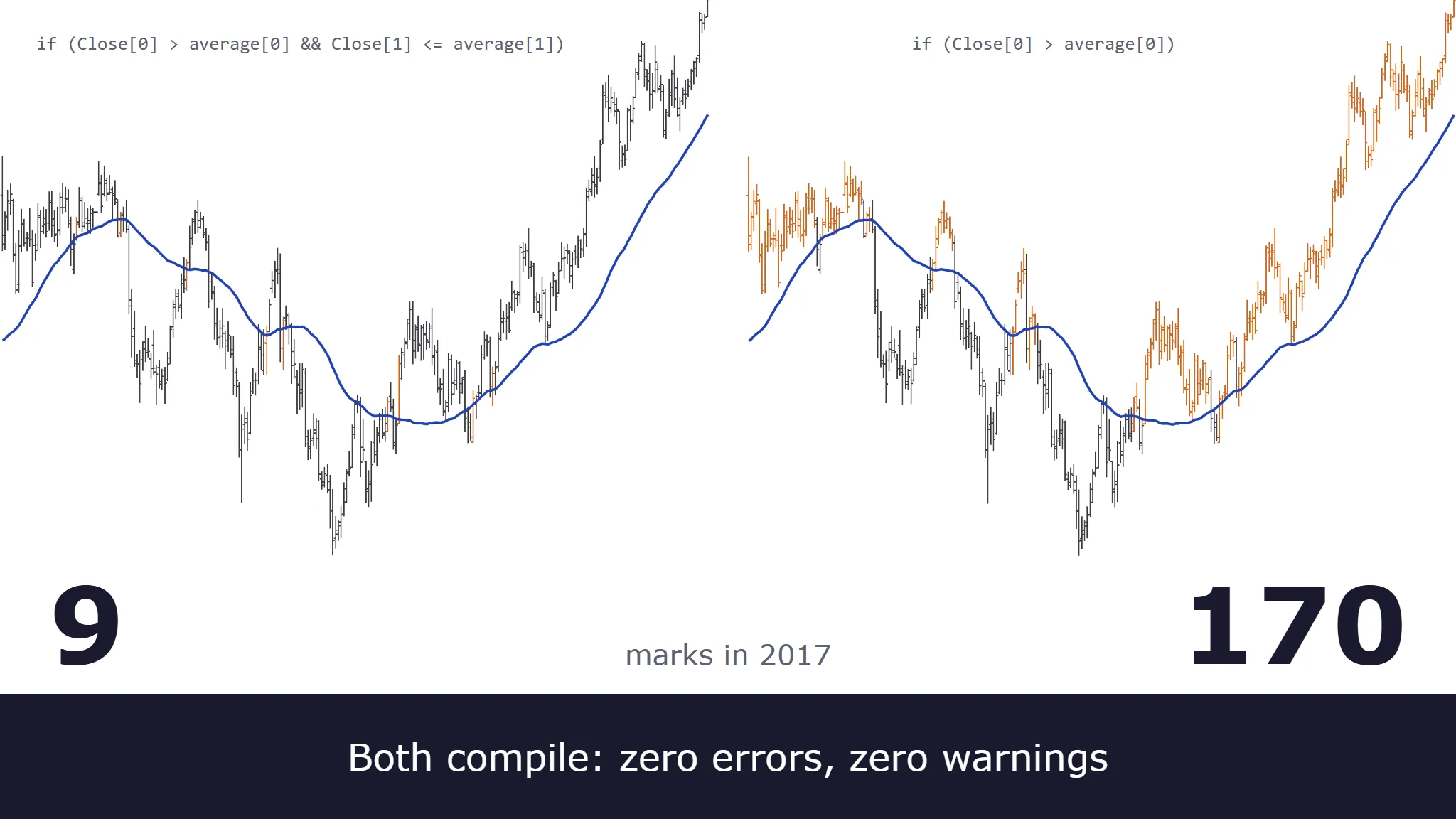
Close > MAand “close crosses above MA” differ by one added comparison. On twenty years of daily crude oil, one is true on 2,862 bars and the other on 188. - Zero signals is not a neutral result. It is either a rule that is genuinely selective or one that cannot fire, and an empty chart looks the same either way.
- Counting is cheap, and a number you did not predict is the finding.
Jump to: What the compiler checks · What it cannot check · Zero signals is a result · Four checks · Before you trade it
What the compiler actually checks
A compiler is doing real work, and the work it does is worth knowing precisely.
Compiling is a translation. The source you wrote is meant for people to read; the platform needs something it can execute, so the compiler converts one into the other, into native machine code in some cases and into an intermediate form run by the platform’s own engine in others. The checking is a by-product of that translation. To convert a statement, the compiler first has to determine exactly what the statement is, which means every name has to resolve to something and every operation has to be one the types permit. An error is a point where the translation could not be completed.
In every language on every platform covered here, a successful build establishes three things:
- The syntax is well formed. Brackets balance, statements terminate, the parser reached the end without getting lost.
- Names resolve. Every function, variable and input you referred to has been declared and exists.
- Types and argument counts are consistent, to whatever depth the language enforces. You did not pass a string where a number was expected, or call a function with four arguments when it takes three.
That is a genuinely useful set of guarantees, and it eliminates an entire category of mistakes before you ever load a chart. Every one of them is a statement about the form of the code, and none is a statement about what it is for.
What “compile” means in practice differs across the platforms, and the differences are worth spelling out.
TradeStation EasyLanguage calls it Verify. It reports into the Verify tab of the EasyLanguage Output Bar and keeps evaluating until it has found 100 errors, so a single run surfaces a batch of problems rather than stopping at the first. The error catalogue is mostly what you would expect: 30061 “Word not recognized by EasyLanguage” for an identifier that does not exist, 30158 “An equal sign ’=’ expected here” for a syntax slip, 30281 “Mixing data types (NUMERIC, TrueFalse, String) not allowed” for a type mismatch.
Verify also enforces a short list of rules beyond those three. Error 30286 “Cannot divide by zero” is one of them, and it shows where that checking stops: Value1 = 25 / 0; is rejected, while assigning zero to a variable first and then dividing by that variable compiles cleanly, because a divisor held in a variable has no value to check until the code runs.
MultiCharts PowerLanguage uses Compile rather than Verify, on F7 or from the editor’s toolbar, and reports into the Build tab of the Output panel. Its documentation describes the behavior directly: during compilation the script is checked for correctness, and if an error is found the compilation process stops and the error is highlighted. Compilation halts at the first error rather than gathering a list, so a run reports one problem at a time. Every study carries an explicit status, either compiled and ready to use or uncompiled and not yet usable, so there is never any ambiguity about whether the version on your chart is the version you last edited.
NinjaTrader NinjaScript is compiled as C#, which means the C# compiler’s type checking applies in full. It also compiles at library scope rather than file scope: NinjaTrader compiles all NinjaScript files, not only the one you are working on. Errors from across your whole collection appear together in the editor, tagged with the file each came from, and a file you cannot fix right now can be right-clicked and excluded from compilation.
MultiCharts .NET is also genuine .NET compilation, in C# or VB.NET, using the Framework’s own compilers. Because a single assembly cannot be built from two languages at once, all C# studies compile into one module and all VB.NET studies into another, and the two are then linked together into a single assembly. One practical consequence is documented and occasionally useful: studies share a process, so static fields can carry data between separate studies.
TradingView Pine Script compiles at two moments rather than one, when you save in the Pine Editor and again immediately before the script starts running. The editor marks the offending code in place, red for an error and orange for a warning, and once the script is on a chart the message is available from its status line. Its type system also carries qualifiers alongside types, in a strict hierarchy: const, then input, then simple, then series. Anything that accepts a value with a given qualifier also accepts a weaker one, but never a stronger one. That catches a real class of mistakes at compile time, for example an attempt to use a value that varies bar to bar somewhere that needs a value fixed before the first bar.
MetaTrader MQL separates errors from warnings explicitly. Errors stop the build, and no executable file is produced when they occur. Warnings do not: the executable gets built, but warnings should not be ignored, because they indicate potential code errors. Both land in the Errors tab of the Toolbox, where the compilation protocol is written, so the difference between them is something you read rather than something the build enforces.
Warnings are worth a note of their own, because most of these platforms will let a build succeed with warnings still outstanding. TradeStation reports them; NinjaScript and MultiCharts .NET inherit the C# compiler’s warnings, where something as ordinary as an unused variable is enough to produce one; and Pine Script and MQL both emit warnings without stopping compilation. A finished build is not the same as nothing left to read.
None of this is weak. That is exactly the difficulty. The more thoroughly a build is checked, the more convincing its silence becomes, because more things genuinely had to be right for it to pass. A clean compile from a strict type system feels like a verdict on the whole program. It is a verdict on the grammar.
What it cannot check
Seven kinds worth separating, all of which survive a clean build. The list is not exhaustive.
| Failure | Caught by the compiler? | What catches it |
|---|---|---|
| State used where an event was meant | No | Counting signals |
| Condition that always or never fires | No | Counting signals |
| History and warm-up gaps | No | The first bars of a chart |
| State and order handling | No | Trade-by-trade review |
| Historical vs. real-time divergence | No | A live log |
| Environment assumptions | No | Another symbol or session |
| Cost of the calculation | No | Timing the run |
1. The rule is not the rule you meant
One version of this is the difference between a state and an event.
“Price is above the average” and “price crosses above the average” describe different things. The first is a condition that stays true for as long as it stays true, potentially for months. The second happens on one bar and is then over. In code the two look almost identical, and both compile.
Here is the state version, written as a NinjaScript indicator:
protected override void OnBarUpdate()
{
    if (CurrentBar < Period)
        return;

    if (Close[0] > average[0])
    {
        signalCount++;
        BarBrushes[0] = Brushes.Chocolate;
    }
}
And the event version, where the only change is to the condition itself:
if (Close[0] > average[0] && Close[1] <= average[1])
The second condition adds the part that makes it an event: it is true only when the previous bar was not above the average, which is what “crosses” means. Both files compile against the same assemblies at the same warning level, with zero errors and zero warnings each. Nothing in the build output distinguishes them.
Strictly, the second version also accepts a bar whose predecessor sat exactly on the average, which is a touch rather than a crossing. In this data that happens once in 5,221 bars, so it does not move the counts below, but it is worth noticing that the corrected version is itself approximate. Precision here is a matter of degree rather than a box you tick.
On a chart they are not remotely the same indicator.
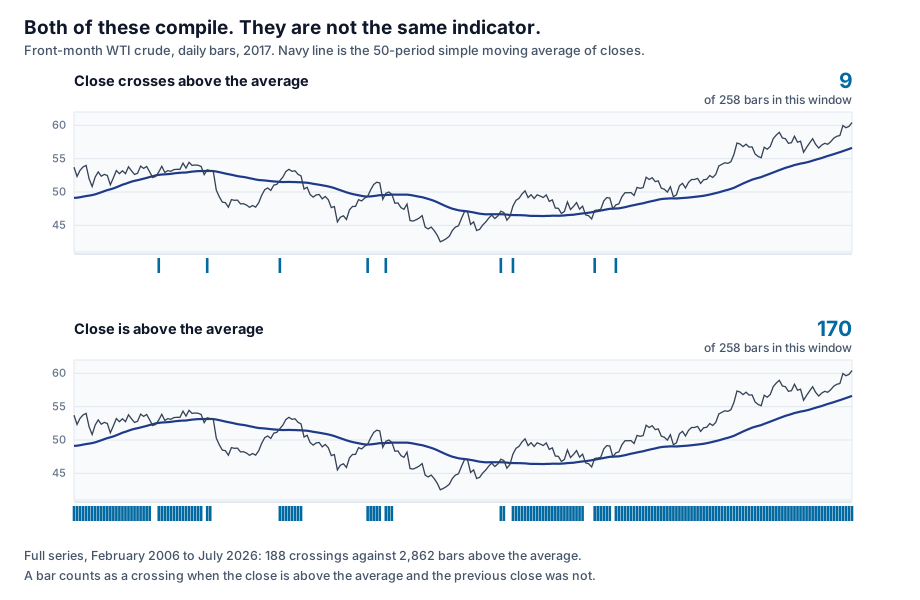
Over 5,221 testable bars, the close crosses above its 50-period average on 188 of them and sits above it on 2,862. If your intent was an entry signal, one of those is a strategy and the other is an instruction to buy roughly every other day.
Two details make this worse than a single slip. The gap widens as the average lengthens, so the same mistake gets more expensive the slower your system is meant to be: at 20 periods it is 317 against 2,811, and at 200 periods it is 92 against 2,695. Meanwhile the proportion of bars spent above the average barely moves, sitting near 54% at every length. The state holds steady while the event count moves more than threefold, and only one of the two is telling you anything about timing.
The same family includes several other mistakes that compile perfectly. An off-by-one bar reference reads the previous bar’s value where you meant the current one, or the reverse. A > where you meant >= changes behavior only on exact ties. Against a computed average those are vanishingly rare, as the touch case above shows. Against another price on a tick-rounded instrument they are not, and that is where the distinction starts to matter. A condition assembled with or where you meant and produces something that fires far more often than intended, and nothing about it is malformed. Bracketing belongs here too. Mix and with or in one expression without parentheses and the grouping falls to the language’s order of precedence, which need not be the grouping you had in mind, and the expression is perfectly valid read either way.
What catches it: counting. Not reading. See count everything below.
2. Logic that can never fire, or always fires
A condition can be structurally impossible and still be perfectly legal code. if (x > 100 && x < 50) is well formed, well typed and unsatisfiable. Real examples can be much less obvious than that. Two conditions that are individually reasonable and jointly impossible, separated by forty lines and added in different editing sessions, will each guard the other into silence without either one looking wrong.
The result compiles, loads, runs, plots nothing and reports no error. The always-fires case is the same defect wearing the opposite mask: a filter that was supposed to be selective and is in fact satisfied on every bar.
This one gets its own section below, because an empty result is so easily read as a neutral one.
3. History and warm-up
Every bar-referencing calculation needs bars to reference. A 200-period average has no meaningful value on bar 20, and a rule comparing the current bar to the value 200 bars ago has nothing to compare against at the start of a chart.
On TradeStation and MultiCharts this is the Max Bars Back setting, and it is worth dwelling on, because it produces a clean example of a defect no compiler can reach. It reserves a number of bars so that your scripts have the history their calculations need, and for an indicator that value can be resolved for you: auto-detection determines the minimum number of bars necessary to perform the calculation required by the study, and uses that value.
That works by inspecting the references in the code, so it holds only when those references are fixed. Write a lookback whose depth is decided while the code runs, held in a variable or computed per bar, and there is nothing to inspect in advance. The depth does not exist until execution reaches it.
None of that is a syntax problem, and the build will not mention it. What happens next depends on whether you are running an indicator or a strategy, and the difference matters more than it sounds.
In an indicator, if auto-detection encounters a surprise, it starts over. When a study turns out to need more history than the current value allows, the platform raises the requirement and recalculates the indicator from the beginning using the new one. That can happen more than once on the same chart. On historical data the cost is time and usable history: reserved bars are not available for calculation, so every increase pushes the study’s first result further into the chart. In real time the cost is larger still, because a recalculation is rebuilt from the bars: anything the indicator had accumulated from live data alone, values that exist nowhere in the stored series, does not survive it.
Push the same mistake further and there is nothing to settle on at all. Give an indicator a requirement that grows with the chart, a lookback driven by bar number so that bar 5,000 asks for 5,000 bars of history, and each recalculation only raises the requirement again. What you see then is an indicator that draws nothing, or nothing for a very long stretch of chart, while raising no error. MultiCharts describes a related symptom, where an incorrect setting can leave a study stuck at “Calculating…” in the status line. Either way you get no plot and no complaint, which is exactly what zero signals is a result below is about.
Strategies have no such fallback. The value is set by hand, and on TradeStation, MultiCharts and MultiCharts .NET alike, code that reaches back further than you allowed for raises a runtime error. TradeStation’s documentation describes what that does: a runtime error automatically disables the study by turning its status to Off, with the explanation in the runtime error window.
The timing is the part to brace for. That error does not have to arrive when you start the strategy. It can surface part-way through a live session, at the first moment the code actually reaches back that far, which may well be while you are holding a position. A defect that the build never mentioned, and that the first hours of running never mentioned either, is then discovered by your open trade.
The reach can be wider than the one study, too. On TradeStation and MultiCharts alike, the figure that applies to signals is the largest requirement among all the signals on the chart, so a single deep lookback pushes back where every one of them begins. It applies across data series as well, and every series has to satisfy it before calculation starts anywhere. The requirement is counted in bars of each series, so on a chart that mixes one-minute bars with daily bars, a setting of 100 asks for 100 daily bars as well as 100 one-minute bars, and nothing calculates until the slowest series has them.
Throughout, the compiler is not involved, because bar counts do not exist until the code runs.
4. State and order handling
Strategies carry state across bars, and the compiler checks none of it. Entering while already in a position, sending an order every bar because the condition is still true rather than newly true, missing a flat check before reversing, cancelling an order that already filled: all legal code, all type-correct.
The state-versus-event confusion in item 1 feeds this one directly. A condition that stays true for forty bars will keep issuing instructions for forty bars unless something in the code says otherwise, and whether that is harmless or catastrophic depends on order-handling details the compiler never examines.
5. Historical versus real-time divergence
Some code takes a different path on historical bars than on live ones, whether because the platform provides different data in each mode, because the code branches on it explicitly, or because a calculation that has the whole series available behaves differently when it is being fed one bar at a time.
Compiled identically. Behaves differently. It is also the one kind of repainting that counts as a defect under all circumstances, which proving whether your indicator repaints covers alongside four others, with three tests that tell them apart.
6. Environment assumptions
Code is written against something: an instrument, a session template, a time zone, a tick size, a point value. Those assumptions rarely appear in the code as assumptions. They appear as constants, or as nothing at all.
A strategy that is correct on the instrument it was written for can be quietly wrong on the next one, and the compiler cannot tell, because a number is a number. A stop expressed as a raw price distance means something different on a two-decimal future and a five-decimal currency pair. Session boundaries and daylight-saving shifts move the bar that a daily rule refers to. Nothing here is a type error.
7. Cost
A loop nested inside a bar-by-bar calculation, each pass walking back over history, is quadratic in the number of bars. It compiles instantly. It might then take forty minutes to load on a tick chart, or make an indicator unusable in real time.
These compilers do not judge what running the code will cost, and the bar count that would decide it does not exist at compile time. Correct code and code you can afford to run are separate questions.
Zero signals is a result
An empty result is easy to accept without checking, so it is worth separating from the rest.
Run a new study, get no signals at all, and the natural reaction is to assume the conditions have not occurred yet. Sometimes that is exactly right, and a genuinely selective rule can be quiet for months.
But nothing distinguishes “correctly quiet” from “structurally incapable of firing” by looking at the chart. Both produce an empty result. The empty result is not neutral, and treating it as neutral is how an unsatisfiable condition survives into live trading, where it continues to do nothing while you wait.
Turn it around: an empty result is a report you have not read yet. It is making a strong claim, that your conditions were never simultaneously true on any bar of the chart. That claim is checkable, and it takes only minutes to check.
Count the parts separately. If the rule has three conditions, count how often each is true on its own, then in pairs. One of three things comes back. Every condition fires and the combination never does, which localizes the conflict to a specific pair. One condition never fires alone, which localizes it to that condition. Or all of them fire in every combination and the rule really is just selective, which is the answer you wanted and now have evidence for.
The same discipline applies at the other end. A rule that fires on almost every bar is making an equally strong claim, and it deserves the same suspicion.
Four checks that go beyond the compiler
None of these require tools you do not already have.
1. Count everything
Print the number of times each condition was true, the number of signals generated, and the number of trades taken. Then compare those numbers against what you expected before you looked.
The comparison is the point. A count on its own is trivia. A count that contradicts your prediction is a finding, and often most of the diagnosis: 2,862 where you expected a couple of hundred tells you the rule is not the rule you meant, before you have read a line of the logic.
Predict first, then count. Reversing the order lets you rationalize whatever number appears.
2. Work five bars by hand
Pick five bars, scattered rather than consecutive, and compute what the indicator should produce on each one yourself. Then compare against what it actually produced.
This is tedious, but it settles questions that counting alone cannot. It catches off-by-one bar references immediately, because a value that is right but arrives one bar late is obvious the moment you line it up against a number you calculated independently. Unlike the other three, it checks the value rather than the behavior.
Include at least one bar from the first stretch of the chart, where warm-up problems live, and at least one from a session boundary or a gap.
3. Change the ground
Move the code to another symbol, another timeframe, a session with a gap in it, the opening bars of a chart. Assumptions are invisible while the environment that satisfies them holds still, and they announce themselves the moment it moves.
This is a fast way to surface item 6 above, and each variation takes only a few minutes. A strategy that behaves sensibly on one instrument and absurdly on the next has told you something specific about what it depends on.
4. Read the warnings
Start with the type-conversion ones. A warning that a value is being converted or truncated is frequently a description of the actual defect rather than noise about style.
Reading them is the platforms’ own advice, not an outside preference. MetaEditor’s documentation says plainly that warnings should not be ignored, because they indicate potential code errors, and Pine Script’s documentation makes the same point in nearly the same terms.
The build succeeding and the code being right are separate facts, and the warning list is where the difference is often written down.
Before you trade it
- Every condition has been counted, and each count was predicted first
- Conditions meant as events test for the transition, not just the state
- Five hand-checked bars agree with the output, including one near the start of the chart
- An empty or near-universal result has been explained rather than assumed
- The code has been run on a second symbol and a second timeframe
- Warm-up and minimum-bar requirements are explicit, including any lookback whose depth is set at runtime
- Warnings have been read, not just errors
- The strategy has been checked for orders sent on every bar a condition stays true
The common thread
A compiler is a grammar checker with a very good vocabulary. It will confirm that your sentence is well formed, that every word in it exists, and that the words fit together. It has no opinion on whether the sentence is true, because truth is not a property of the language.
Everything in this article is the same failure in different clothes: code that says something coherent, but not what you intended. The checks that catch it all use the same move: make the code state a number, then compare that number against what you expected. If you would rather have someone else run those checks on your code, that is what our AI code review and strategy validation work is for.
Frequently asked questions
Does a clean compile mean anything at all?
Yes, and it is worth being precise about what. It means the code is syntactically valid, that every name you used exists, and that your types are consistent. That eliminates a real category of mistakes, and it is why the false confidence is so easy to fall into: something meaningful genuinely was verified. It just was not the part about whether the code does what you intended.
Which platform’s compiler catches the most?
Comparing them is less useful than it sounds. Each compiler above checks the grammar of its own language, and none checks meaning. A stricter type system will catch more type mistakes, which is worth having, but it does not move the boundary. The failures in this article were chosen precisely because they are not type mistakes, so a stricter type system does not reach them.
My strategy compiles and produces no trades. Is it broken?
It might be correct and selective, and it might be structurally unable to fire. Those look identical from the outside, which is the problem. Count each condition separately, and then in pairs, and the two cases separate immediately. See zero signals is a result above.
Does this apply differently to AI-generated code?
The failures are the same ones, and they are not specific to how the code was produced. What differs is volume and pace. Generated code arrives quickly and reads fluently, and a clean compile on top of fluent-looking code is a persuasive combination. The verification it needs is exactly the verification hand-written code needs. There is just more of it arriving, faster, and a clean compile is not any part of that verification.
Is a warning safe to ignore if the build succeeded?
Sometimes, and it is not a decision to make without reading it. Warnings about unused variables are usually cosmetic. Warnings about implicit type conversion, truncation, or comparison between mismatched types are often the defect itself, stated plainly. Reading them takes seconds.
Nothing here is trading advice, and none of it is a promise about results. See our risk disclaimer.