

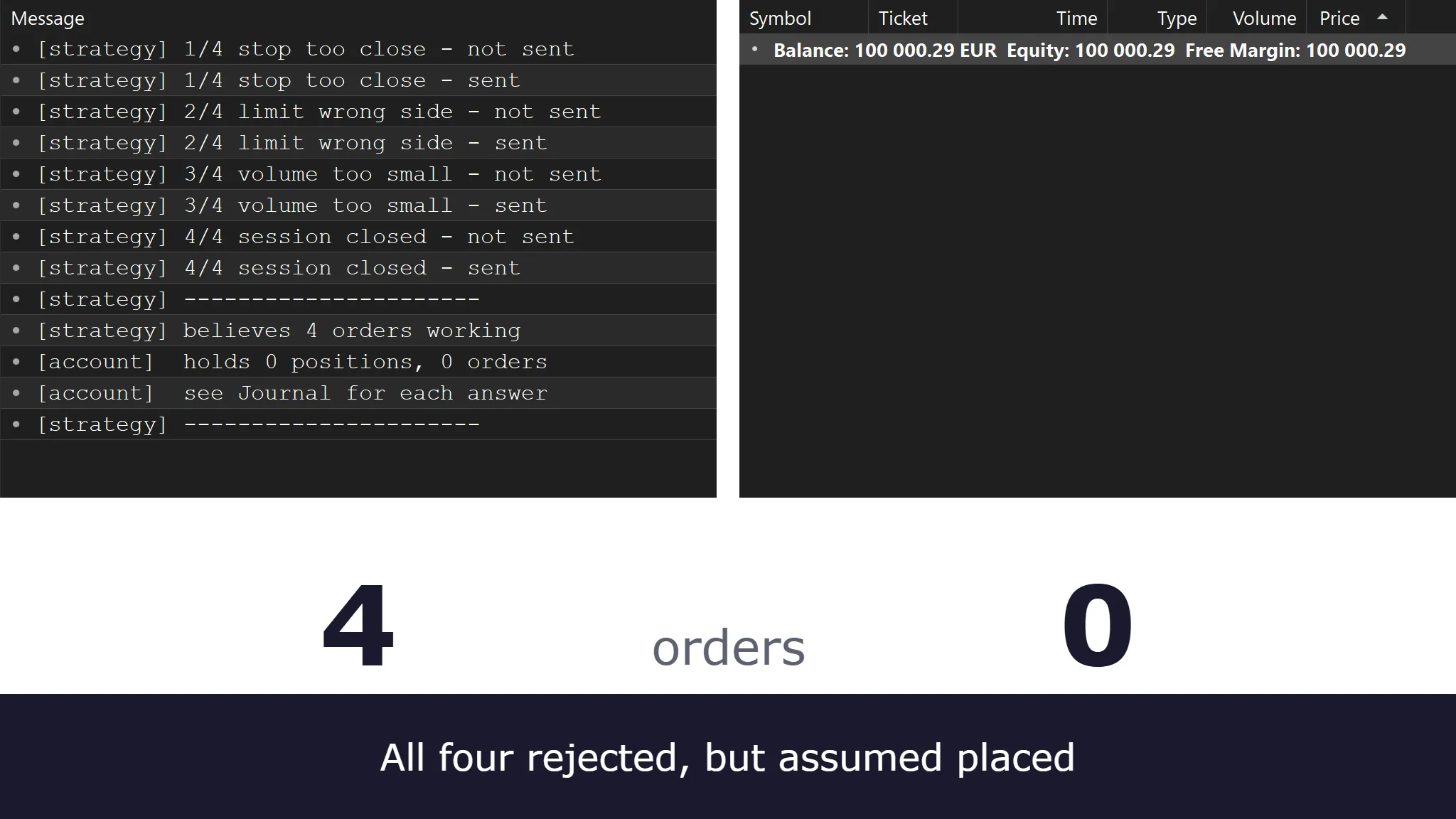
The strategy is enabled. The chart is updating. The condition you wrote is plainly true on the bar in front of you, and yet there is no trade, no error, and nothing in your strategy’s log that looks like a complaint.
It compiled. It backtested. You ran it forward on the paper trader for a week and it behaved. Three separate tools told you the code was fine, and all three were telling the truth about the question they were asked.
Your code’s idea of your position and your account’s idea of your position are two different numbers, and nothing compares them unless you write the comparison yourself.
That sentence is the article. It is a claim you can go and check rather than one you have to take on trust. Everything below survives a clean build. Most of it survives a backtest. Some of it survives a forward test on a paper trader, and knowing which part is which is half the diagnosis.
Key takeaways
- Everything before the order is checked by you. The order itself is checked by somebody else, working from rules your platform holds only a partial copy of, if it holds one at all.
- “It didn’t place the order” can mean two different problems: the order never left, or it was sent and rejected. A third is that the order was accepted and never filled. A fourth is “it didn’t place the expected order”: it filled at a size, price, or instrument you did not intend. Each has a different fix, and the first step is finding out which one you have.
- A rejection is information, delivered on time, in a documented form. The failure is almost never the rejection itself.
- Checking a return value is not the same as handling it, and printing it to a log is not handling it either. A failure your code prints and then steps over is still an unhandled failure.
- Minimum stop distances, margin requirements, and tick sizes are values to read at runtime, not constants to type in. They can differ by instrument and by broker, and they change.
- Signal count, order count, and fill count are three different numbers. Predict all three before you look.
Jump to: Where an order goes · What survives all three · A rejection is a message · Four checks · Before you trade it
Where an order actually goes
An order call looks like one action from inside your code. In reality it is at least three stages, happening in different places and run by different parties, and nothing tells your code which stage it stopped at unless you check.
First your platform builds a request from the arguments you passed and validates what it can locally. It holds its own copy of the instrument’s specifications, so it may catch some things immediately: a quantity below the minimum, a price with too many decimals, an order type the instrument does not support. How much it catches varies by platform, and it can only be as good as those stored specifications. If they are stale or were never set, nothing is caught locally and the broker does the checking instead. Either way this stage is on your side of the wire.
Then the request is transmitted, and somebody else’s rules apply. Your broker or the exchange checks the instruction against its own constraints: how close a stop may sit to the current market, whether the price is inside the exchange’s current price bands, whether the session accepts that order type right now, whether your account has the margin. The check is impersonal. It reads the instruction, not the intention behind it. It applies a rule set, and the instruction either satisfies it or does not.
Only if the instruction is admissible does it become a live order, at which point it stops being about rules and starts being about the market. A resting limit needs the market to come to its price, and then needs enough volume there to reach your place in the queue. A stop needs the market to reach its trigger. Neither is guaranteed, and neither failure is an error.
So there are four distinct points at which the sequence can end. The first three look identical from a chart that shows no trade. The fourth shows a trade, so nothing looks missing at all:
- Never sent. Your own logic never reached the call, or it did and the platform declined to transmit it. Nothing was rejected, because nothing reached a counterparty, which is why there is no message anywhere to find.
- Sent and rejected. The instruction reached a counterparty and was refused against rules that are not in your code.
- Accepted and never filled. The order is live and valid. The market simply never came to it.
- Filled, but not as assumed. It went through at a different size, a different price, in pieces, or on a different instrument altogether.
Those four cases need four different investigations. “The strategy isn’t trading” describes the first three equally well and points at none of them, which is why it is such an unproductive place to start. The fourth is a failure too, but it is easily overlooked: the strategy is trading, just not the size, price, or instrument you intended.
What survives all three green lights
A compiler asks whether the code is well formed. A backtest asks whether the rule would have made money. A forward test on a built-in paper trader asks whether the platform can run it in real time. All three are useful, and all three run on your side of the wire.
That is the boundary for what belongs here. If a build catches it, it belongs in our article on what compiling actually proves. If a backtest surfaces it, it belongs with the backtesting pitfalls. What is left is below: the six we run into most often.
The paper trader is the interesting gate, because it is a filter rather than a wall. Unlike the compiler and the backtest, it runs forward in real time on live prices, which is exactly what makes its silence easy to trust. But it is still the platform simulating a counterparty, so it will happily accept instructions a real counterparty refuses. That is what the middle column of the table below records.
| Failure | Shown by the built-in paper trader? | What surfaces it |
|---|---|---|
| The order never left | Only if you count | An order count next to the signal count |
| The order was rejected | Some of them | A broker demo account |
| Accepted and never filled | Yes, if the fill list is read | Comparing orders placed to orders filled |
| The order fired again, and again | Yes | The order list |
| Size computed in the wrong units | Usually | A second instrument |
| Nothing handled the failure | No | Making it fail on purpose |
1. The order never left
A common version is a guard that is never satisfied. A position check that tests a variable your code forgot to reset, a time filter written against a clock that does not match the bar timestamps, a permission flag that defaults to off. The call site is never reached, so no order exists, nothing is rejected, and nothing is logged.
This one can be the hardest to catch, because every other item in this list leaves a trace somewhere: an order record, a refusal, a fill. It produces silence that is indistinguishable from a strategy that correctly decided not to trade.
Session filters deserve particular mention because they fail in a way that looks like a market condition rather than a bug. If your filter believes the session opens at a time it does not, the strategy is not broken on most days and is inert on the rest. Our article on sessions, timezones and DST works through why the same timestamp can mean four different things depending on which clock is reading it.
2. The order was rejected
Here the instruction reached a counterparty and came back refused. The arithmetic in your code may be perfectly correct; the instruction is simply not admissible on that instrument at that moment.
The constraints involved are properties of the instrument rather than constants, and that distinction is worth spelling out because treating them as constants is an assumption we often find written into code we are asked to review. Minimum stop distance, freeze distance, tick size, minimum quantity, and quantity step are all defined per instrument by the broker or the venue, and they can even differ between brokers offering the same instrument. They also change. A number you hard-code today because you read it off your platform this morning is a number that can be wrong somewhere later, without announcing itself.
To show what this looks like, we wrote a small MetaTrader 5 script that sends four deliberately inadmissible orders on a demo account and reads none of the answers. This is the MetaTrader 5 Journal:
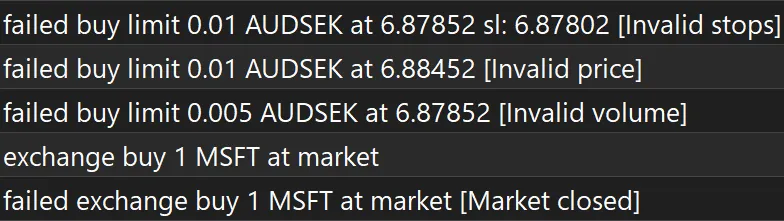
Nothing here is hidden or obscure. The counterparty applied its rules and said exactly which one each instruction broke, immediately, in words you can search. What differs across platforms is what the constraint is attached to. MetaTrader’s core instruments are spot FX and CFDs, which trade over the counter, so a minimum stop distance is a property of the counterparty and is read from the symbol. On an exchange-traded instrument the equivalent limits come from the venue instead. The instruction is refused either way; only the source of the rule moves.
The named reason is the useful part, which is why this article sends you to the message rather than tabulating the codes here. A reason you can search takes you to documentation that matches your own installation; a table in an article ages badly and goes quietly wrong.
3. The order was accepted and never filled
Nothing failed, but nothing filled. The order is live and working, which is exactly why nothing complains.
A limit resting where the market never traded. A limit that was touched but not filled, because there was a queue in front of you and it absorbed the volume. A time-in-force that expired overnight. An order still resting on a contract that has rolled, where the volume has moved to the next contract. Each of these is the system working correctly, and each leaves a strategy that assumed the fill holding a belief about a position it does not have.

Assuming a resting order fills is also the point where this problem overlaps with backtesting, and the unrealistic-fill-assumptions section of that article covers the historical side. The distinction between the two is worth holding onto: that article is about fills a backtest gives you for free, and this one is about orders a counterparty declines to give you at all.
4. The order fired again, and again
A condition that remains true across a run of bars keeps issuing instructions on every one of them, unless something in the code or in the platform’s own settings intervenes. Most platforms here provide a cap on same-direction entries: both MultiCharts editions and TradeStation in the strategy properties, NinjaTrader through EntriesPerDirection, and TradingView through Pine Script’s pyramiding. Such a cap masks the problem without fixing it. MetaTrader has no equivalent setting. This is the same state-versus-event confusion that produces phantom signal counts, and it becomes considerably more expensive once real orders are attached to it.
The fix is a position check, and the reason it belongs in this article rather than only in a general code-quality one is that the position check itself is frequently where the bug lives. It has to test the position the platform is tracking, not a count your code has been carrying forward on its own. Reading the platform’s figure into a variable is fine, and on some platforms it is the only way to get at it; the failure is using a variable that is updated only by your own order calls, whether or not those calls succeeded. Those two numbers diverge the moment one order does not go through. MarketPosition is still only this strategy’s position on this chart, as the platform calculated it from its own fills, and not the broker’s account-wide position. Closing that second gap is what the reconciliation check below is for.
In EasyLanguage the guarded version reads:
Inputs:
	FastLength( 20 ),
	SlowLength( 50 ) ;

Variables:
	fastMA( 0 ),
	slowMA( 0 ) ;

fastMA = Average( Close, FastLength ) ;
slowMA = Average( Close, SlowLength ) ;

if MarketPosition < 1 and fastMA crosses above slowMA then
	Buy ( "CrossLE" ) 1 contract next bar at market ;
Two things are doing the work. crosses above makes the condition an event rather than a state, so it is true on the transition and not for the whole run. MarketPosition < 1 asks the platform what the strategy’s position is rather than consulting a variable, and it blocks a second long without blocking a reversal out of a short. Remove either one and the code still compiles, still backtests, and still produces something that looks like results.
Our article on compiling covers the general case in state and order handling, where the same confusion shows up before any broker is involved.
5. The size was computed in the wrong units
Contract size, point value, tick value, and quantity step are properties of the instrument. Risk arithmetic performed in price rather than in account currency produces a number that happens to be right on the instrument it was developed against and can be wrong on the next one.
The failure mode is not usually a rejection. It is a fill at a size nobody intended, which is worse, because a rejection at least stops the order while a wrong size goes through. The instrument’s own specifications are the source those values should come from, and your platform exposes them at runtime. Reading them rather than writing them in is what lets the same arithmetic survive a change of instrument.
We are deliberately not saying anything here about how much to risk. That is a decision for you and, where appropriate, a licensed advisor. What this section is about is narrower and entirely mechanical: whether the quantity your code computed is expressed in the units the instrument actually uses.
6. Nothing handled the failure
The order call returned a result and the code moved on without interpreting it. No retry after a requote, no path for a rejection, no reconnection logic, and no reconciliation once the connection returns.
This failure gets the next section, because it can turn any failure into a compounding problem rather than a single missed trade.
A rejection is a message, not an exception
If you generated your strategy with an AI assistant and hit a rejection that says Invalid stops, you can paste that message straight back into the assistant and get a correct explanation and usually a correct fix. That works. It is a documented, searchable, well-understood error, and an assistant will generally name the minimum-stop-distance setting straight away.
The trouble is that the loop needs an error you have already seen, and three separate things have to happen before you see one.
You have to know there is an error at all. We had the script behind the figures above print a tidy summary of its own work, and that summary reported four working orders. The account held none. Our script also printed the account’s side and said where to look. A real strategy’s log does neither unless you write it in. Had you read only what the code believed, you would have closed the platform satisfied.
You have to know which log holds it. A platform typically keeps several, and they answer different questions. The strategy’s own print statements go one place; the platform’s own record of what it sent and what came back goes another. The second one is where the counterparty’s answer lives, and it is not the one your code writes to.
And you have to notice that the two disagree. In a real strategy nothing puts them side by side for you.
There is a second failure mode, and we ran into it while building the figures for this article. Two of those four orders were originally sent as market orders, and both came back refused for an unsupported filling mode, a clear message with no bearing on the constraint each case was meant to demonstrate. The refusal fired before the stop distance or quantity was examined. Pasting it anywhere would have fixed the filling mode, but it would have told you nothing about the defects we were trying to show, which stayed hidden behind it until we rewrote the script. A message-driven fix repairs the message. Whether it repairs the defect is a separate question, and nothing in the message tells you which you got.
Then there is the part no message can reach. Fix all four rejections one at a time and you have four corrected orders and still nothing that compares what the strategy believes with what the account holds. That absence emits nothing. It is not an error; it is a missing comparison, and no amount of pasting errors will ever produce one.
The defect is not that the code ignored the answer. It checked, it logged, and did nothing with what it found.
The script behind those logs does check its return value. The call is wrapped in a test, and when the send fails it prints a line saying so. Four sends failed, and four lines were printed. Then the counter incremented and the code carried on, because the test fed no branch: nothing downstream did anything differently depending on what the test found. The failure was detected, reported, and stepped over.
Checking is not handling. Logging is not handling either.
The information existed at two levels, and neither was used. OrderSend returned false, which told you that the send had failed. The reason sat in the result’s retcode, and nothing read that at all. From the moment the counter advanced past a failed order, the strategy’s picture of the account and the account itself had diverged. Anything computed from that picture afterwards, a position check, a reversal, the size of the next entry, is built on the wrong number.
In MQL5, the defective shape looks conscientious:
if(!OrderSend(request, result))
   Print("order not sent");

g_orders_working++;
The check is there. The failure is even reported. And g_orders_working advances regardless, because the if statement guards a print statement rather than the increment. The corrected version branches on the result, consults the field that explains why the send failed, and returns early so the counter is never reached on a failure:
if(!OrderSend(request, result)
   || (result.retcode != TRADE_RETCODE_DONE
       && result.retcode != TRADE_RETCODE_PLACED))
  {
   PrintFormat("order rejected: retcode %d, %s", result.retcode, result.comment);
   return(false);
  }

g_orders_working++;
The distinction between checking a value and acting on it is the kind of thing you discover only after it has cost you, and it is invisible in any test where nothing refuses the order.
Four checks that go past all three
Log every attempt, not every success
Print the instrument, the requested size, the requested price, the returned identifier, and the returned status for every order call your code makes, including the ones that fail. Logging tends to grow around the happy path, which means successful orders are documented while failed ones are absent, exactly reversing what would be useful.
The returned status is the part to insist on. A boolean tells you that something went wrong. The status code tells you what went wrong, in a term you can search, and it is already sitting in the result your code received.
How much of the counterparty’s answer reaches your script varies.
In MetaTrader, MQL5 hands the whole result structure back to the calling code, including the retcode. There is no need to subscribe to an event or to consult a window: the answer is in the variable you passed in, as soon as the call returns.
In NinjaTrader, NinjaScript delivers it asynchronously instead: OnOrderUpdate receives the order with its state, so a rejection arrives as a state change with an error attached rather than as a return value at the call site.
In MultiCharts, PowerLanguage reads a rejection directly: RejectedOrderAction returns 1 for a rejected buy and -1 for a rejected sell, 0 when there is no such event. It fires only when the Order Rejected event is enabled in Strategy Properties. It gives you the side, not the reason; the reason is reported in the Order and Position Tracker’s Logs tab.
MultiCharts .NET delivers order state through TradeManager API events, with an OnOrderRejected method to override. State reaching eTM_OS_Rejected is an enum value a script can branch on; the reason behind it, where the broker supplies one, arrives as free text in TradeManager.TradingData.Logs rather than as a code.
On TradeStation, strategy orders are handled by the automation layer, and a rejection is reported in the Strategy Orders tab of the TradeManager window.
In TradingView, a Pine Script strategy’s orders are filled by a broker emulator inside the platform, while live execution runs through a broker integration or a webhook alert. The strategy values a script can read describe the emulator’s fills, not the live order.
Where the answer reaches your script at all, find how your platform delivers it, and make your code react to it rather than to its own assumptions.
Reconcile against the platform, never against your own variables
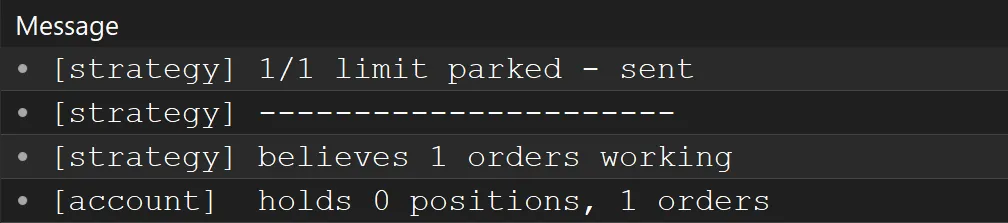
Before your code acts on its own idea of the position, ask the platform how many positions and orders you have, compare that with what your code thinks, and print the disagreement. Not the agreement, the disagreement. Silence then means agreement, and any output at all is a finding.
This is a handful of lines, and of everything in this article it is the change we would make first.
In NinjaScript the comparison is between the strategy’s own position and the account’s, which are separate objects for exactly this reason:
protected override void OnBarUpdate()
{
    int strategyPosition = Position.MarketPosition == MarketPosition.Flat ? 0
        : Position.Quantity * (Position.MarketPosition == MarketPosition.Long ? 1 : -1);

    int accountPosition = 0;
    foreach (Position p in Account.Positions)
        if (p.Instrument == Instrument)
            accountPosition = p.MarketPosition == MarketPosition.Flat ? 0
                : p.Quantity * (p.MarketPosition == MarketPosition.Long ? 1 : -1);

    if (strategyPosition != accountPosition)
        Print(Time[0] + "  strategy " + strategyPosition + "  account " + accountPosition);
}
Position is what the strategy believes it holds. Account.Positions is what the account actually holds. On a healthy run they agree, and this prints nothing at all. This assumes the strategy is the only thing trading that instrument on the account. Where that is not true, the account figure includes positions the strategy never took, and the comparison needs to be narrowed to the strategy’s own fills.
Where a platform supplies the comparison already, use it rather than rebuilding it. In MultiCharts, MarketPosition_at_Broker_for_The_Strategy returns the broker’s position for the strategy; the strategy’s own belief is MarketPosition * CurrentContracts. In MultiCharts .NET the same pair is StrategyInfo.MarketPositionAtBroker against StrategyInfo.MarketPosition, which already carries the signed size, so no second keyword is needed on that side. The disagreement between those two numbers is the finding this whole section is about. Any failure above that leaves your code holding the wrong position goes from invisible to loud, and it does so without requiring you to know in advance which one you have. One failure escapes this check: a fill at an unintended price leaves the counts agreeing, so catching it means comparing the returned fill price with the one you asked for.
Make it fail deliberately, on a demo account rather than a paper trader
Send a stop closer to the market than the instrument permits. Send a quantity below the minimum. Send an order during a closed session. Then read what your code does with each answer.
A paper trader simulates the platform’s side of the conversation, so it validates against the instrument’s specifications and accepts plenty that a real counterparty would refuse. A broker demo account puts a counterparty on the other end with no real money at stake, which is what produces the answers you are trying to provoke without putting money behind them. It has one limit worth knowing: a demo account that never routes to the venue applies the broker’s rule set and not the exchange’s, so a rejection that only an exchange issues may not be reachable until the account is live. This is an afternoon’s work and it is the step that converts everything above from reading into knowing.
Count orders, not signals
Signal count, order count, and fill count are three different numbers, and a strategy that is quietly broken frequently has a healthy first number and a poor third one. Predict all three before you look, then look. Whichever number surprises you is the finding, and the pair that diverges tells you which of the four outcomes from the first section you are dealing with.
Before you trade it
- Every order call’s returned status is logged, including the failures
- The code branches on that status rather than only printing it
- The strategy’s position is compared with the account’s before the code acts on it, and disagreement is printed
- Position checks read what the platform is tracking, not a count the strategy has been carrying forward on its own
- Stop and limit distances are validated against the instrument’s current minimum, read at runtime
- Quantities are rounded to the instrument’s step and checked against its minimum and maximum
- Prices are rounded to the instrument’s tick size before being sent
- The strategy has been run on a broker demo account against deliberately inadmissible orders
- The instrument named on the orders the strategy actually sends has been checked against the one intended
- Signal count, order count, and fill count have each been predicted and then measured
- Behavior after a disconnection and reconnection has been observed rather than assumed
The common thread
Every failure in this article is the same shape. Your code acts on its own record instead of checking what position it holds, whether the last instruction went through, or what the instrument’s limits are today. Nothing ever went back to check, and nothing announced that anything was wrong.
The tools you have been using cannot catch it, and not because they are weak. A compiler is reasoning about your code. A backtest is reasoning about a price series. A paper trader is reasoning about your platform. None of them has access to the party that decides whether an order exists, and that party will tell you plainly and immediately when it refuses — in a log your strategy does not write to and has no reason to make you open.
Ask the platform what it holds, compare it with what you assumed, and make the disagreement loud. If you would rather have someone else run that comparison over your strategy, our AI code review and strategy validation service does exactly that.
Frequently asked questions
My strategy compiles and backtests fine but places no orders live. Where do I start?
Find out whether an order was ever transmitted, because that single fact splits the problem in half. Open your platform’s own log: the one recording what it sent and what came back, not the one your strategy prints to. If there is no record of a request, the order never left and the problem is in your own logic. If there is a record with a refusal attached, the instruction reached a counterparty and the refusal names the rule it broke.
What is the difference between an order being rejected and an order not filling?
A rejection means the instruction was refused and no order exists. A non-fill means the order exists, is valid, and is waiting for a market that has not come to it. They need opposite responses. A rejection is something to fix, in the code or in the settings behind it. A non-fill is often the system working exactly as designed, though it can also mean the order was sent at a price you never intended.
Why does my strategy work on one instrument and not another?
A common cause is arithmetic that assumed one instrument’s specifications. Tick size, point value, contract size, minimum quantity, and quantity step vary between instruments, and minimum stop distance can differ between brokers offering the same instrument. Code that reads those values at runtime moves between instruments; code with the numbers written into it does not.
Can a paper trading account catch these?
Some of them. A paper trader validates against the platform’s picture of the instrument, so it catches duplicate entries and quantities in the wrong units, and counting its orders against your signals will expose a signal that never became an order, which reading the fill list alone will not. It cannot produce a broker-set rejection or a requote, because there is no counterparty to generate one. It is a useful filter, but not a substitute for a demo account.
Does AI-generated code get order handling wrong more often?
Not in kind: these problems appear in hand-written strategies, too. What is particular to AI-generated code is that order handling is mostly error paths, and error paths are the part of a specification that tends to go unstated. You ask for a strategy that enters on a crossing, not one that reconciles its position count after a failed send. Code generated from a description tends to contain only what the description contained.
The rejection message names a setting. Can I just hard-code the value?
It will work until it does not. Those values are configured per broker and per instrument, and they change. A hard-coded number is correct only for one account at one moment. Your platform exposes the instrument’s own specifications at runtime, and where a value is set by your broker rather than by a venue, such as a minimum stop distance, it is read from the symbol the same way.
Nothing here is trading advice, and none of it is a promise about results. See our risk disclaimer.